
Description
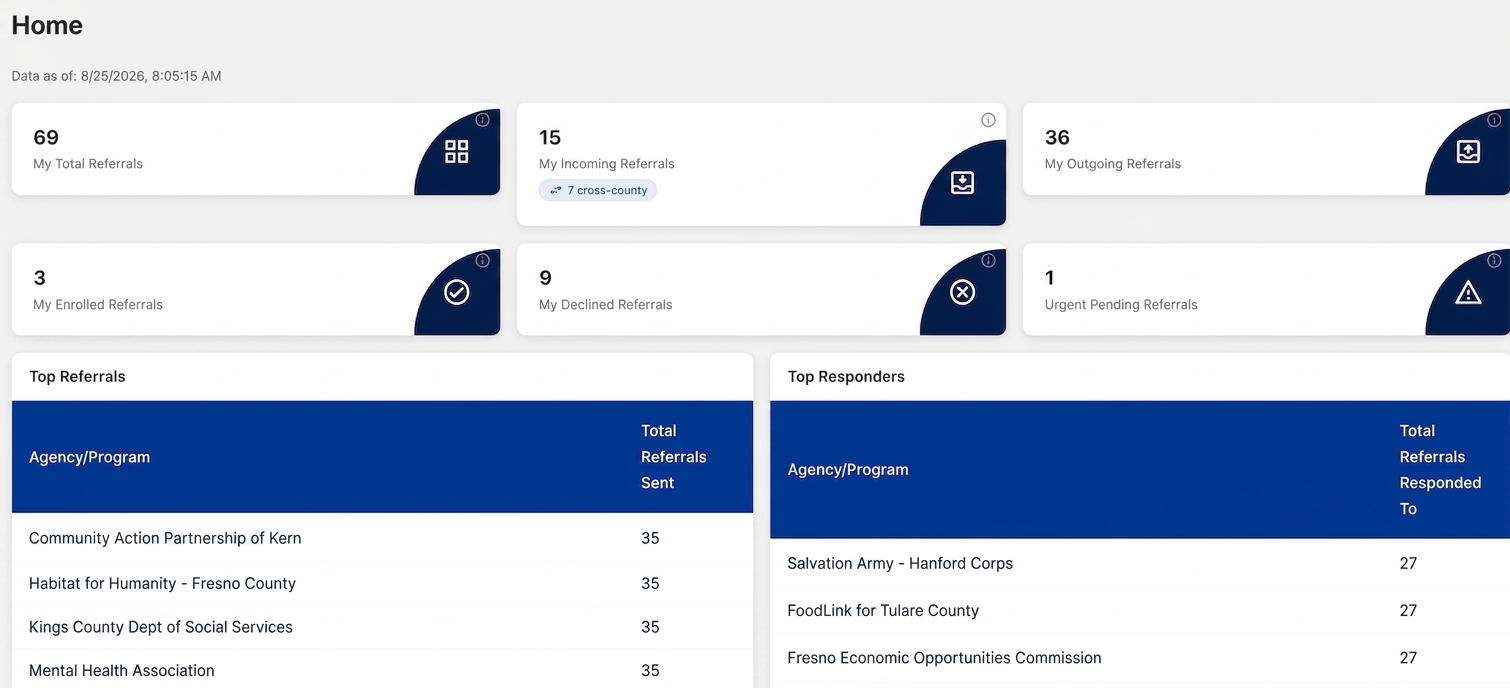
The Dashboard provides a high-level overview of your agency's referral activity within SRN. Dashboard widgets display referral totals, referral outcomes, urgent referrals requiring attention, and agency referral activity. The dashboard is intended to help users quickly monitor workload, identify referrals that need action, and review overall referral performance.
Available to:
Agency Admins, Agency Staff
Navigation
After signing into SRN, the Dashboard is displayed as the Home page. You can return to the Dashboard at any time by selecting SRN Summary from the left navigation menu.
Dashboard Data
Data As Of: Displays the date and time the dashboard statistics were last refreshed.
My Total Referrals: Displays the all-time number of referrals your agency has sent or received. This total is not limited by a reporting period.
- Includes:
- Incoming referrals
- Outgoing referrals
- Enrolled referrals
- Declined referrals
My Incoming Referrals: Displays referrals currently assigned to your agency that require action.
- Includes:
- Pending referrals
- In Progress referrals
- Does Not Include:
- Enrolled referrals
- Declined referrals
Cross-County Badge: If displayed, the cross-county badge indicates the number of incoming referrals originating from outside your county.
My Outgoing Referrals: Displays the all-time number of referrals your agency has sent to other agencies or programs.
My Enrolled Referrals: Displays referrals received by your agency that resulted in a client being enrolled in a program or service.
My Declined Referrals: Displays referrals received by your agency that were declined by your program.
Urgent Pending Referrals: Displays Incoming referrals marked as Urgent that are still awaiting action. These referrals should be reviewed promptly to ensure timely response and service coordination. These do not include your Outgoing Urgent referrals. See: Urgent Referrals.
Top Referrals
The Top Referrals table displays the agencies or programs that have received the highest number of referrals from your agency.
Agency/Program
The receiving agency or program.
Total Referrals Sent
The total number of referrals your agency has sent to that agency or program.
Notes
- Displays the top referral destinations for your agency.
- Helps identify commonly used referral partners.
- The table displays up to five agencies or programs.
Top Responders
The Top Responders table displays the agencies or programs that most frequently respond to referrals sent by your agency.
Agency/Program
The responding agency or program.
Total Referrals Responded To
The number of referrals that received a response from that agency or program.
Notes
- Helps identify agencies actively participating in the network.
- Responses may include actions such as In Progress, Enrolled, or Declined.
- The table displays up to five agencies or programs.
Best Practices
- Review Incoming Referrals daily to identify referrals requiring action.
- Monitor Urgent Pending Referrals regularly to prioritize time-sensitive cases.
- Use Top Referrals to understand which organizations your agency refers clients to most often.
- Use Top Responders to identify agencies that consistently respond to referrals.
- Verify the Data As Of timestamp when reviewing dashboard metrics to ensure you are viewing current information.
- Remember that dashboard referral counts are cumulative and are not intended to replace detailed reporting available through the Referral Summary Report.