Description
Client consent allows agencies to share information and coordinate services through the Smart Referral Network (SRN).
Consent does not automatically make a client visible to every agency in the network. Client information is only shared with agencies that are actively serving the client through SRN workflows, such as the agency that obtained consent or agencies that receive referrals involving that client.
Consent Access Model
|
Agency |
Access to Client |
|---|---|
|
Agency that captured consent |
Yes |
|
Agency that receives a referral for the client |
Yes |
|
Agency with no referral or service relationship |
No |
Notes
- For new clients, consent is captured during the Create Client workflow.
- When an agency receives a referral, SRN grants access to the client information necessary to review and respond to that referral.
- Having an active consent on file does not make a client searchable by all SRN agencies. Access is limited to agencies that are directly involved in serving the client through SRN workflows.
Find an existing SRN client to capture consent
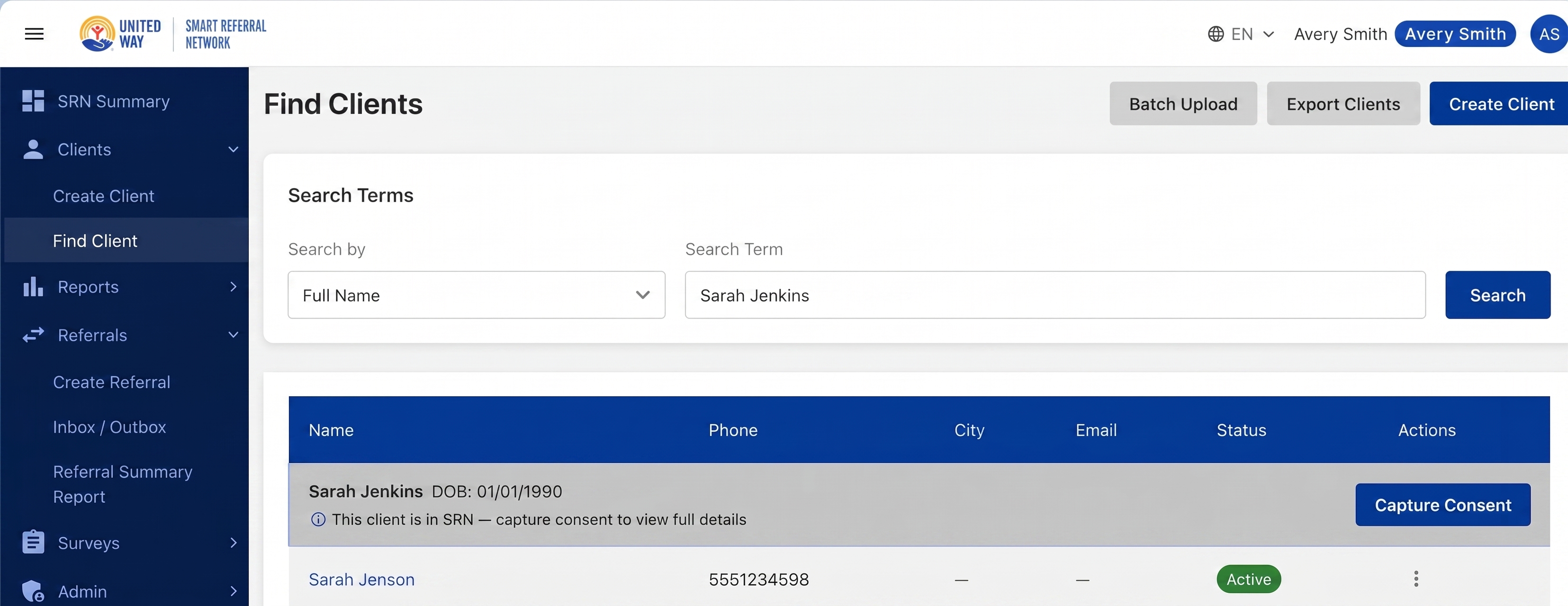
If your agency does not currently have access to an existing SRN client record, but needs to obtain consent to provide services, you can still locate the client and capture consent without creating a duplicate profile.
Navigation
Click Clients on the left navigation and select Find Clients.
Finding the client to capture consent
Search using Find Clients. Once you locate the correct client you will see a Capture Consent button. Click that button and capture the client’s consent. You will then be able to see the client’s profile and make referrals on their behalf.
Consent Documents
Current Consent documents are found on this page:
https://www.unitedwaymcca.org/srn-resources
Revoking Consent
See Revoking Consent page